CCTV Product Guide
ONVIF
ONVIF (Open Network Video Interface Forum) is a global and open industry forum that was formed to facilitate the development and use of a global open standard for physical IP-based security products. The forum aims to standardize how IP products within the video surveillance industry communicate with each other.
ONVIF Benefits for End Users
- Greater flexibility
- Increased product choice
- Future proof
ONVIF gives you the flexibility to pick and choose optimal products for your needs without being locked into a specific brand. An ONVIF conformant video management software, for instance, will allow you to integrate ONVIF conformant devices from different hardware manufacturers. With software that supports both ONVIF and proprietary application programming interfaces (APIs), you can choose to use the ONVIF interfaces for certain functionalities and the proprietary API for other features at the same time. Having ONVIF conformant products is like having an insurance policy that future-proofs your system for a more secure investment.
Types of security cameras
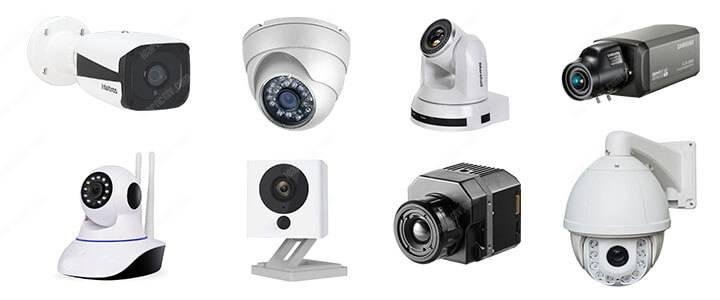
There are a lot of different types of security cameras to choose from.
In this article, I explain what are the most common types of security cameras so you can have a better decision before purchasing the one you need.
At first, you can choose between analog and digital (IP) technology, the most appropriated type for indoor or outdoor installation and then you can select other features such as Wi-Fi communication, night-vision, integrated audio, etc.
Below a list of the most common types of security cameras:
- Analog cameras
- Digital (IP) cameras
- PoE cameras
- Wireless cameras
- Wire-Free cameras
- Indoor cameras
- Outdoor cameras
- Box cameras
- Dome cameras
- Turret cameras
- Bullet cameras
- PTZ cameras
- Day/Night cameras
- Thermal cameras
- Panoramic cameras
Analog cameras
This is the type of technology that is used by a security camera to transmit the signals to a monitor or a recorder, usually via coaxial cables such as the RG59.
This type of security camera is very popular on installations that require a certain number of cameras connected to a centralized digital video recorder (DVR).
You can also use a monitor to see all the images at the same time.
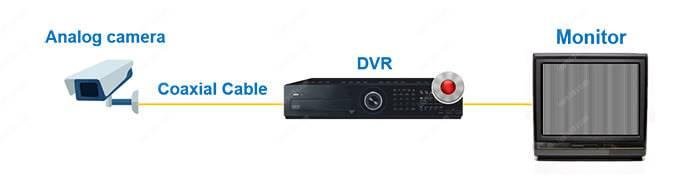
The picture below shows an example of an analog camera connected to a DVR and a monitor via coaxial cable. It’s a pretty simple and inexpensive system.
Let’s say you want to have 8 cameras installed on your home, you can hire a professional installer that can install everything for you.
Or you can save some money if you are willing to install the kit yourself.
If that’s the case, purchase your security cameras, grab your tools and read the article, DIY home security camera system installation.
Analog cameras don’t send the video directly to a mobile phone, so you need an extra device (the DVR) to convert the signals from analog to digital.
When buying an analog security camera, it’s possible to find old and new types of technologies with different resolutions.
The old analog camera technology represents its resolution in TV Lines (TVL) and the new one uses modern nomenclature such as 720p, 1080p, HD and Full HD.
Many years ago, any analog security camera catalog was showing resolution in TVLs and the more TVLs the camera had, the better.
TVLs lines represent how many horizontal lines can be displayed on a monitor to show you an image. But this is old technology and don’t have to use it anymore.
New analog security cameras come with new technologies that allow higher resolution and they are described in a digital format.
That means they are measured after the DVR conversion (remember DVRs converts from analog to digital).
So in the market, you can find analog security cameras that use technologies such as HD-TVI, HD-CVI, and AHD that have 720p, 1080p resolution.
Want a practical example? You can look for a security camera kit on Amazon, just make sure it brings the type of cameras you need for your particular case.
Just take a look at the image below. You can see it offers 4 analog cameras and a DVR recorder that can handle up to 8 analog cameras.
You can’t see the image from an analog camera directly on your mobile phone, tablet or computer unless you use a DVR as an intermediate .
You can also use a monitor to connect the analog camera directly to it but that option is not that interesting since you won’t be able to record the footage.
That’s why analog cameras are more difficult to install and setup.
Let’s move on to the next type of camera…

Digital (IP) cameras
IP cameras are very popular today since there are some types of home security cameras that are inexpensive and easy to install.
They don’t require technical skills for the basic setup.
As a practical example, take a look at the camera shown in the picture below, it’s an IP camera that works with audio/video and is compatible with the Amazon Alexa.

That’s an example of a consumer IP camera that’s easy to install.
A security camera that allows you to watch the live video directly into your mobile phone, it’s always an IP model, it doesn’t matter if it’s wired or wireless.
An IP camera can work by itself and doesn’t necessarily needs an external recorder since it can record on an SD card or use a cloud recording server.
Of course, there also models that can use a local recorder.
There are a lot of different types of security cameras that use IP technology and some of them are designed for the professional market.
These type of security cameras (professional models) usually requires an external local recorder known as NVR (Network Video Recorder).
The picture below shows a professional IP camera that is connected to an NVR and to a monitor for local recording and monitoring.
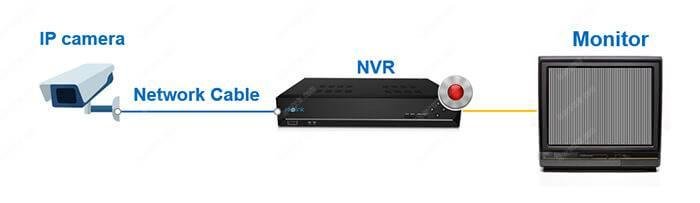
So, basically the IP camera sends the digital signals directly to the NVR and from there it’s possible to visualize the videos using a monitor or an external device.
You can use your computer, tablet or mobile phone to watch live and recorded video as long as the NVR is connected to a router.
As you already know, IP security cameras send digital video do a recorder or to the network, that means their resolution is measured in a digital format such as 720p, 1080p, and Mega Pixel. Again the higher the resolution, the better.
It’s common to find IP security cameras with resolutions such as 2MP, but there are also a lot of professional cameras with a much higher resolution such as 3MP, 5MP, and even 30MP, but they are not necessary for small home projects.
Nowadays most of the security cameras use IP technology.
It doesn’t matter if you buy a basic consumer model or a professional one.
Consumer IP cameras are easy to setup as long as you have simple steps to follow.
On the other hand, professional IP cameras require more technical skills.
Either way, those types of cameras are largely available in the market.
Let’s talk about other variations of IP cameras…
PoE cameras
OK, now that you understand what an IP camera is, it’s easier to understand this type of security camera since a PoE camera is also an IP camera.
PoE stands for Power Over Ethernet which is a technology that allows you to power the camera via the UTP (network) cable.
So it’s not necessary to use a power supply thus saving you some time and money.
To power this type of camera is can buy a PoE Switch that uses the same universal standard to power network devices. Take a look at the following picture.
You can also replace the switch with a Network Video Recorder (NVR) that has such a PoE feature to power the cameras on.
Above is an example of a PoE Home Security Camera System that can handle up to 8 cameras. In this case, the NVR can send power to every camera using PoE.
This is a good example of an IP camera system that is PoE compatible.
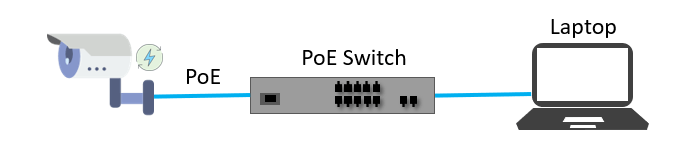
As you can see, a PoE camera is just an IP camera that doesn’t need an extra power supply since it gets the power directly from the network cable.
The concept is very simple to understand but bear in mind that it’s necessary to follow the international PoE standard to power up the devices.
So, before purchasing your camera and switch check the specifications.
You must look for the 802.1af and 802.1at PoE international standards.
Wireless cameras
Why use cables if you can just buy a wireless camera ?
That’s the way most people think and they are right…
But of course, there are some limitations when working with this type of security camera since it’s designed to work in homes and small offices.Many wireless security cameras require at least one cable or wire for power; “wireless” refers to the transmission of video/audio.
It’s very easy to find these types of cameras available in any electronics store since they are inexpensive and anyone can install and setup them.
Here’s another practical example of a wireless camera…

As you can see the camera is offered as a Wi-Fi camera, which means it can connect to your Wi-Fi router to send video directly to your mobile phone.
For professional applications, it’s recommended using a combination of PoE IP cameras with professional wireless radio transmitters but that’s not the topic of this article and you can learn more about that by reading other articles.
Alright, here’s another type of security camera that is very interesting because it doesn’t use cables at all and that’s awesome, isn’t it?
People usually confuse the wireless cameras with the wire-free cameras and just in case you are also wondering what are the differences between them, now it’s the perfect time to finally understand this topic.
Wireless security cameras transmit video, audio, and any other data without the need for cables by using a Wi-Fi connection with a wireless router. But these types of cameras still need to be attached to a power supply cord, so they still use wires.
Wirefree cameras
Wire-free security cameras don’t use wires at all since they are battery-powered and can also send the data (audio, video, alerts, etc) via a Wi-Fi connection.
Easy to understand, huh? Wire-Free cameras are really 100% free of wires!
Let’s see a practical example again…
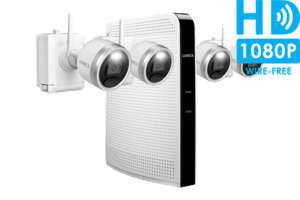
Can you see the camera is offered as a Wire-Free Indoor/Outdoor camera?
Once again you can see that it is a mix of the types of cameras since it’s a Wire-Free model but it also can work indoors, outdoors and use its night vision feature.
Indoor cameras
If you are planning to purchase a security camera for your apartment, chances are you are going to install it in a place that is protected from the weather.
That means you need an indoor security camera and that’s great news since all the cameras are ready to work in such an environment where’s there’s no rain or sunlight to hit them. So, just look for an Indoor model with the features you want.
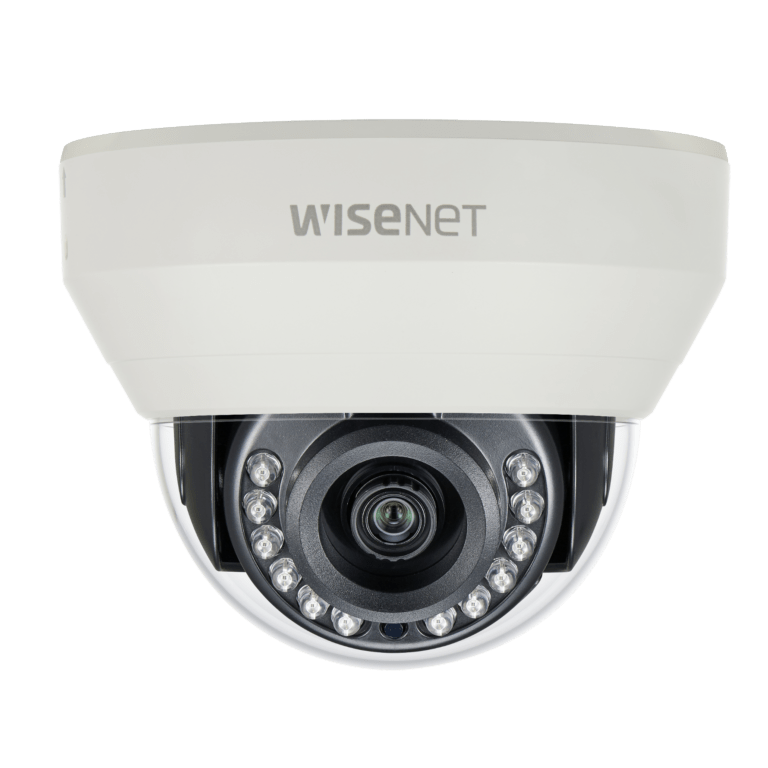
So, what I’m saying is that no matter what type of security camera you buy, they certainly have the minimum requirement to work in your room, kitchen or whatever place you want to install them (as long as you don’t put them on places such as bathrooms or saunas).
There’s an international standard named IP (Ingress Protection) that is used to classify the protection a device has against dust and water and for an indoor camera IP65 is enough.
With IP65 ingress protection, your camera is safe to be installed indoors, that’s it.
Outdoor cameras
Outdoor security cameras are weather-resistant since their enclosure is IP66 or IP67 classified, which means they are dust and water-resistant and can be installed in areas where they are hit by rain or sunlight without getting damaged.

Before purchasing an outdoor security camera just look at the specification to see what is the ingress protection and if it comes with a durable and weather-resistant enclosure. This is information is usually available at the product box or manual.
Unless you want to emerge the camera in water, the IP66 is enough for most installation and you don’t need to spend extra money buying an IP67 one.
As you can see, it doesn’t matter if it’s an analog, IP or wireless camera, all of them can be classified as indoor or outdoor camera depending on their enclosure.
Sometimes you can’t get a model that is only indoor rated because you are interested in the features the security camera offers.
It’s up to you choose the model that suits your needs.
Box cameras
Box cameras are rarely used in homes or small projects, they are more commonly used on special projects that require more control over the lenses.
They have a box shape (that’s why they have such name) and their lenses come separated from the main CCTV camera body as shown in the picture.
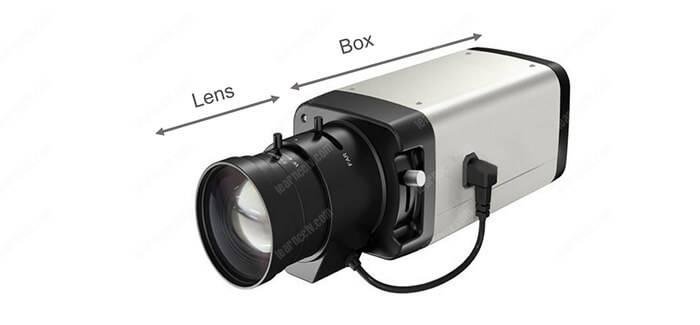
You just need to choose which lens you want to use when buying a box camera
These types of cameras are not usually found in homes or small offices because the installation and adjustments are not practical.
A contractor is usually the best person to install and setup this type of camera since is necessary to have some expertise for some adjustments.
Next time you visit places such as a shopping mall or a bank, take a look at the security cameras around the place, usually, you can see some box cameras.
The lenses used in a box camera can be adjusted to guarantee a better angle of view, so a camera like this is very versatile.
Dome cameras
This is the most popular CCTV camera model sold in stores, you can find this type of camera pretty much everywhere. Just look around and you will see them.
Security dome cameras have a dome body shape with a lens in the center and also can have some infrared LEDs to illuminate the environment.
This is the most popular CCTV camera model sold in stores, you can find this type of camera pretty much everywhere. Just look around and you will see them.
Security dome cameras have a dome body shape with a lens in the center and also can have some infrared LEDs to illuminate the environment.

Dome cameras are very popular because they are discreete and cheap.
These types of cameras are also very easy to install and setup.
You can buy dome cameras with fixed or varifocal lenses, which means you have an option to adjust the angle of view according to the place they are installed.
It doesn’t matter what’s the technology behind the camera (analog or IP), a dome camera looks exactly the same when you look at them.
There are some manufacturers that offer a smoked dome to hide the camera lens so people can’t see where the camera is pointing at.
Turret cameras
Similar to the dome cameras, the turrets are also discrete models.
Look at the picture below to note how this type of camera has some similarities with the dome, however, it’s not quite the same model.

Contrary to the dome, the turret camera doesn’t require opening the camera enclose to move the direction the camera is pointing to.
There’s no acrylic dome in this case, but just a glass in front of the lens.
It’s also possible to buy a turret camera with infrared LEDs but it’s usually not possible to use a varifocal lens since there’s no way to adjust it.
This model is very popular because the installation process is super fast.
You only need to mount drill some holes on in the wall to mount the camera and adjust its position without even open it.
Just like the domes, a turret camera is available with analog or IP technology.
Bullet cameras
Bullet cameras are also very popular. They also have a discrete body shape similar to the lens and infrared LEDs in the center.
The advantage of a bullet camera is that it is discrete and can be easily adjusted in different positions, some models are designed for outdoor installation.
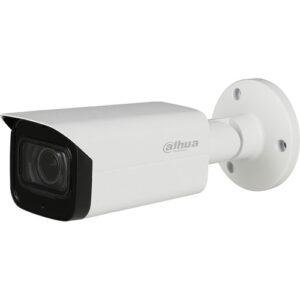
Similar to the dome cameras, the turrets are also discrete models.
Look at the picture below to note how this type of camera has some similarities with the dome, however, it’s not quite the same model.
PTZ cameras
Have you ever seen those CCTV cameras that can be remotely controlled by some security guards sitting in a surveillance room? I’m sure you already saw it in movies and that’s a real example of the PTZ cameras in operation.


PTZ stands for Pan Tilt and Zoom. Those are the movements the camera can do when somebody is remotely controlling it by using a computer or joystick.
This type of camera can be remotely controlled from the recorder, computer or even from a mobile phone. You can setup for all these types of applications.
You can have an analog or IP PTZ camera, either way, it’s possible to use different methods to send the command to the camera and control its movements.
Day/Night cameras
OK, you’ve installed your security camera and can monitor everything…
But, how about night time? Can you see what’s going on?
That’s the perfect case for day/night cameras that are designed to see in the dark by using infrared lights, Even you can’t see with naked eyes, the camera can!
These types of cameras use LED (Light Emitting Diode) to illuminate the area where the security camera suppose to monitor.
This type of light is invisible for your eyes but not for the day/night camera that can “see” in a differentelectromagnetic spectrum (just a technical term).
Day/Night cameras have such a name because they can work during the day with natural illumination and during the night using the LEDs.
The best day/night cameras have a filter known as ICR (Infrared Cut Removal) that are removed at night time to improve the quality of the images.
So, before purchasing some day/night camera take a look at the specification to make sure it comes with this type of filter.
As you can imagine at this stage you already know that a day/night camera can also be classified as analog, or IP camera with wired or wireless transmission.
A day/night camera can also be powered by a PoE switch (or an NVR) and meet the requirement for outdoor installation as long it’s at least IP66 rated.
If you are reading this entire article, now you understand that there are a lot of different types of security cameras combined in a single model.
I’m glad you are here and want to learn more, so let’s keep moving…

Thermal cameras
This is the type of camera you can’t hide from because it can generate images based on the heat irradiation, which means it can see everything based on the temperature. No matter if you are trying to hide behind a bush.
You usually don’t buy a thermal security camera because it’s an expensive model that is usually used only on special projects that requires some serious investment.
It’s also the type of camera that requires special permission in most of the countries, so you need a license to use it (usually approved by the army).
Did you watch the movie “Predator” with Arnold Schwarzenegger?
If you did, you have an overall idea of how a thermal camera “sees” the images, it’s exactly the way the predator does, with different colors according to the object temperature (there are some models that show only black and white images).

A Thermal camera is used for military operations on borders and to hunt fugitives in the dark. You can see them also on helicopters used for night missions.
I bet you are thinking about the thermal cameras you can even use on your mobile phone to check the plumbing behind the wall, aren’t you?
You might be wondering “these types of security cameras are not that expensive and don’t require a special license”. You are right, but those are not security cameras, they are still thermal cameras but for a different type of application.
FLIR is the company behind these thermal cameras, either for professional or consumer applications and boy, they are very good at design such products.
You can even have a drone flying with these types of security cameras…
Well, at least some military personnel has access to such technology!

Panoramic cameras (fisheye cameras)
These types of security cameras are awesome!
Just imagine a camera using a type of lens that can capture the images in an entire room. With 360º coverage, there’s no blind spot and you can see everything.
It’s just like the cameras used by the Google Street View team.
You can use a panoramic security camera to record footage the same way.
After recording the footage, the camera allows you to navigate into its memory and see everything in different ways, including flat videos.
This process is called dewarp.
A panoramic camera is also known as a fisheye camera.
This name comes from the type of lens used by such cameras.
There are professional panoramic cameras (as shown in the video) and also some simple models for the consumer market.
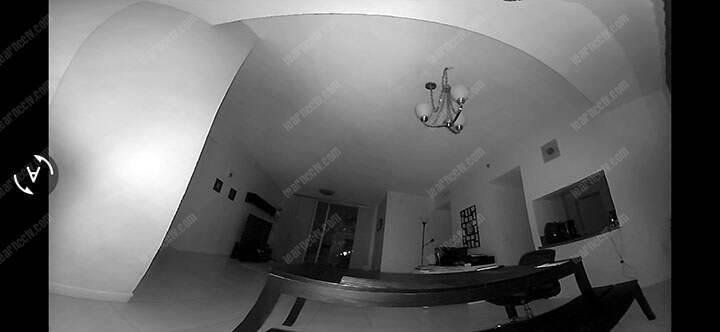
The image below shows the camera in a desk with a 180º view.

Since the camera is close to a wall, the 180º view is the best option.
As you can see, it’s possible to monitor the entire room without any blind spot.
The camera also has night vision which is really awesome.